
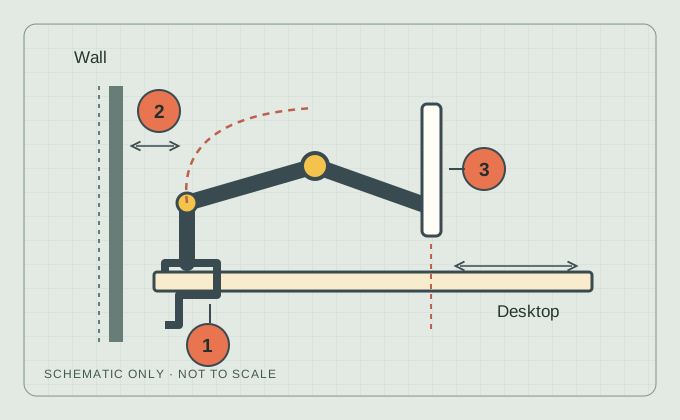
- Attachment: desk suitability, clamp dimensions and access below.
- Rear space: room to fit the hardware and fold the arm.
- Screen position: where the display needs to end up.
Original explanatory schematic. Not to scale; no product-specific clearances are shown.
Check 01
Start with the exact screen
Find the monitor model, its mounting-hole pattern and its weight without the stand in the monitor manufacturer’s documentation. Include any adapters or accessories that the arm’s instructions require you to count. Screen diagonal alone does not establish compatibility.
Check the lower limit as well as the maximum. For example, the current Herman Miller Flo product sheet lists a monitor-weight range of 2–7 kg. A 1.8 kg screen is below that published range even though it is light. This is a specification example, not a product recommendation.
Manufacturer reference: Herman Miller · Flo product sheet ↗Check 02
Look underneath the desk
Measure the desktop thickness at the proposed attachment point. Then look for a drawer, support rail, apron or cable tray that occupies the clamp space. A thickness that matches the clamp range does not establish that the desk construction can carry it.
Check the desk manufacturer’s mounting guidance and the exact clamp instructions. If the material or mounting suitability is unknown, keep it unknown. Do not assume a reinforcement plate solves an unsupported mounting arrangement.
Check 03
Can you install it there?
Installation access and everyday movement are different checks. Can the clamp slide into position? Can you reach and tighten its screw? Does the selected attachment need space underneath, behind the desk, or both?
Ergotron’s MXV attachment guide illustrates the difference. Its two-piece clamp can be disassembled where access behind the desk is limited. Other pictured clamp options need slide-on access. Use the instructions for your exact attachment; do not transfer one model’s clearances to another.
Manufacturer reference: Ergotron · MXV attachment guide ↗Check 04
Check the folded position, too
Use removable paper to mark the mounting point and the front edge of the screen where you want it. Compare that position with the arm’s official dimensional drawing, including the space behind the display and above the desktop.
Maximum reach is only one end of the movement. Check where the joints sit when the arm folds back. Include cable travel through the positions you plan to use. If the manufacturer’s drawing does not settle the wall clearance, ask before ordering.
Check 05
Keep more than one route open
A clamp is one way to attach an arm. A manufacturer-approved grommet mount may suit an appropriate existing hole, subject to the desk and mounting instructions. Keeping the current stand—or comparing a compact desktop stand—is also a valid outcome.
Desk Fit can help compare surface footprints for those stand-based layouts. It does not calculate arm movement, structural support or safe mounting. Return to the checks on this page for those questions.
Manufacturer reference: Ergotron · Monitor arms and stands ↗| Approach | Question to settle |
|---|---|
| Clamp | Does the exact clamp fit a supported edge, with room for installation and movement? |
| Grommet | Do the desk, hole and manufacturer’s mounting instructions support this attachment? |
| Current or compact stand | Can its full footprint fit the layout you need? Use Desk Fit to compare. |